This is default featured post 1 title
Go to Blogger edit html and find these sentences.Now replace these sentences with your own descriptions.This theme is Bloggerized by Lasantha Bandara - Premiumbloggertemplates.com.
This is default featured post 2 title
Go to Blogger edit html and find these sentences.Now replace these sentences with your own descriptions.This theme is Bloggerized by Lasantha Bandara - Premiumbloggertemplates.com.
This is default featured post 3 title
Go to Blogger edit html and find these sentences.Now replace these sentences with your own descriptions.This theme is Bloggerized by Lasantha Bandara - Premiumbloggertemplates.com.
This is default featured post 4 title
Go to Blogger edit html and find these sentences.Now replace these sentences with your own descriptions.This theme is Bloggerized by Lasantha Bandara - Premiumbloggertemplates.com.
This is default featured post 5 title
Go to Blogger edit html and find these sentences.Now replace these sentences with your own descriptions.This theme is Bloggerized by Lasantha Bandara - Premiumbloggertemplates.com.
Security is a system of safeguards designed to protect a computer system and important data from damage or access by unauthorized persons. Different antivirus and firewall programs are used to manage the security of the computer. Some time this is build-in antivirus or firewall program in windows XP to maintain the computer security. But if your windows is not provided with any antivirus, firewall program and Automatic Updates, your windows security center will alerts you a message "Your computer may be at risk. Your virus protection status is unknown" with useless repeating reminder. You can disable this message permanently by changing the values of “AntiVirusDisableNotify” in windows registry.
- First click on Start button then type Regedit in Run option.
- Here locate the location to:
· HKEY_LOCAL_MACHINE\SOFTWARE\Microsoft\Security Center
- Here in right side panel, double click on AntiVirusDisableNotify and set its value 1.
- Now close the registry editor and restart your computer after any changes to go into effect.
1. Using hamachi:-
Introduction:-
The Reason which stop you from connecting to remote computer using dynamic ip is that your isp provide you two ip one which is inside the Lan and other outside the lan this is that ip which change every time you On your computer or restart connection( so because of that conflict you can do remote connection with computer). so one way of doing remote connection would be by joining same lan(then we don't need to go outside the lan) and then connecting to the computer. therefore for this we use hamachi(software) which you can download from here http://www.ziddu.com/download/8296376/hamachi.msi.html.
Steps:-
1. As soon as downloading gets over install it into your computer in the process of installing it will ask you for
a) Your name
b) Network to join(you can create a network)
c) password of network(give password for that network)
here you can consider network as one lan and to join any network you must know password because you want to connect to your friends computer so tell your friend to join the network that you have created.
2. once hamachi is installed look at system tray you will found here a three green dots in traingular form (appeared) click on it.
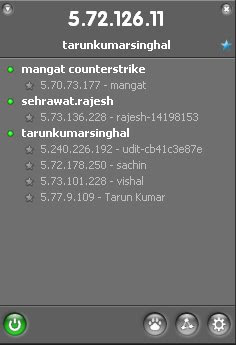
3. then you will get a window as shown.
the ip shown on the above part of this window is your ip address and similarly your friend will get different one. after you both join the group you both will be listed into your network. hence now you can use these ip address for remote connection.
NOTE:- you can use my network
network: tarunkumarsinghal
2. Using Ammyy Admin
Introduction:-
other way of remote connection is using other software.
there are so many software on the web that can be used for remote connection. but most of them are so complecated that we first have to read about them on net before we use it. so to sovle this problem i have found one software which is very easy to use and operate. named ammy admin it is a free software.
Steps to use it for remote connection are as follow:-
1. downoad it from here http://www.ziddu.com/download/8296362/AMMYY_Admin.exe.html.
2. start by double clicking.
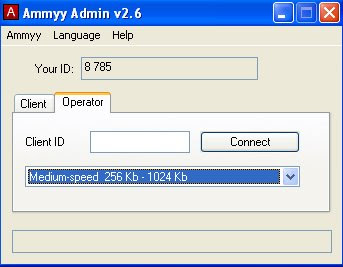
3. a window will open ask your friend for it your id and write it into your windows box and click connect and that' it.
4. Now enjoy remote connection.
15 Imidiate rapid shut down window
while shutting down window. open task manager(Ctr+Alt+Del),
Select shut down tab. and press ' Ctrl ' key while select Turn Off from dis tab.
Count 5 4 3 2 1 Voila!!! U r window will rapidly shut down.
Speed Up Ur Shut down !!
Start Regedit.
Navigate to HKEY_LOCAL_MACHINE/SYSTEM/CurrentControlSet/Control.
Click on the "Control" Folder.
Select "WaitToKillServiceTimeout"
Right click on it and select Modify.
Set it a value lower than 2000 (Mine is set to 200).
and !
Like previous versions of windows, it takes long time to restart or shutdown windows xp when the "Exit Windows" sound is enabled. to solve this problem you
must disable this useless sound. click start button then go to settings -> control panel -> Sound,Speech and Audio devices -> Sounds and Audio Devices -> Sounds, then under program events and windows menu click on "Exit Windows" sub-menu and highlight it.now from sounds you can select,choose "none" and then click apply and ok. now you can see some improvements when shutting down your system.


